Tap the rally. Get the call.
“Is it 4-2-1 or 4-2-2?” Tap the side that won the rally and Pickle Call settles it: the point or the side out, server 1 or 2, and the call, on iPhone, iPad and Apple Watch.
On the App Store soon
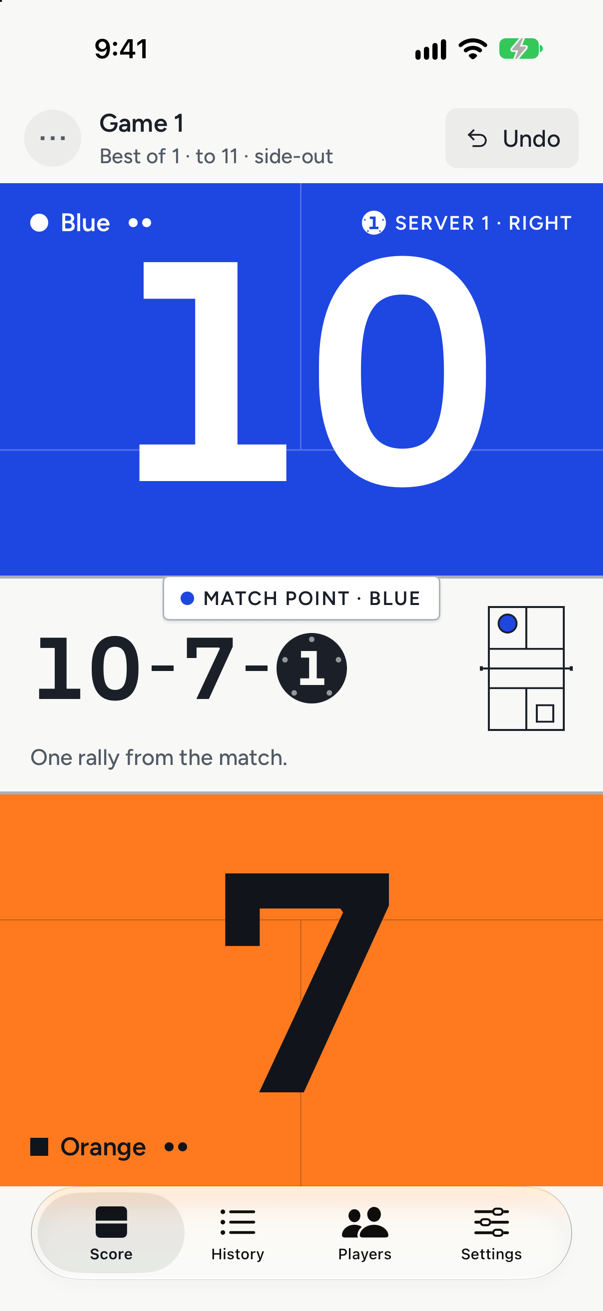
The calls Pickle Call gets right
- 0-0-2
- The first call in side-out doubles. Pickle Call starts every game there for you.
- Server 1 or 2
- Which partner serves, as the last number of the call, and from which side.
- 6 · 8 · 11
- When to switch ends in a one-game match or deciding game to 11, 15 or 21.
- Win by 2
- Games to 11, 15 or 21, and matches of 1, 3 or 5 games.
Six rallies of doubles, called
Blue serves first. Here is what Pickle Call shows after each tap.
0-0-2
Before the first serve. Only one Blue player serves this turn, so the game opens on server 2.
1-0-2
Blue wins the rally: a point, and the server moves to the other side of the court.
0-1-1
Orange wins it: side out. The call turns around, and the Orange player standing on the right serves first.
0-1-2
Orange loses one: the serve goes to the partner, server 2. No point changes hands.
1-0-1
Orange loses again: side out. Blue’s player on the right serves as server 1.
0-1-2
Tapped the wrong half? Undo takes that rally back and the call returns to 0-1-2. You can keep going back, right to the first serve.
The first time you open Pickle Call you play a warm-up game on the real score screen. Each tap is explained as it happens, up to the first side out; then you start a real game.
What players ask between rallies
- Who serves next?
- The highlighted player, from the side marked on the small court. Pickle Call keeps where all four players stand after every rally, so the serving side comes from the server’s position, not a guess from the score.
- Do we switch ends now?
- Pickle Call tells you: between games, and at 6, 8 or 11 in a one-game match or deciding game to 11, 15 or 21.
- Is this game point?
- The call says so, and so does match point. Games are won by 2, so play goes on past 10-10 until one side leads by 2.
- Wait, that rally was ours.
- Undo takes back the last rally. Keep tapping it to go back further, right to the first serve. On Apple Watch, turn the Digital Crown.
- Can I keep score without touching the phone?
- Yes. With voice scoring on, say “Blue” or “Orange”, a team name, or “us” and “them”, and say “undo” to take one back. Your iPhone recognises the words itself; no audio is sent anywhere. Voice scoring comes with Court pass.
- Will it work on my phone, iPad and watch?
- iPhone and iPad with iOS 18 or later, and Apple Watch with watchOS 11 or later. A game started on the iPhone or the Watch shows live on the other.
Everything it keeps track of
See it feature by featureThe score call
The call in three numbers, server score first, ready to say before every serve.
IncludedServer 1 or 2
Who serves, as server 1 or 2, and from which side, drawn on a small court.
IncludedSide-out scoring
Points only for the serving side, server 1 then server 2, then side out.
IncludedRally scoring
A point on every rally, one server per turn, the call as two numbers.
Court passApple Watch scoring
One tap per rally, the Crown to undo, and a different buzz for each outcome.
Court passiPad scoreboard
A full-screen courtside board the next court can read, scored from the iPad.
Court passSingles and doubles
Two servers and a three-number call in doubles; one server and two numbers in singles.
IncludedGames to 11, 15 or 21
Games to 11, 15 or 21, win by 2, matches of 1, 3 or 5 games, ends called.
Voice scoring
Say who won the rally and the score moves; say “undo” to take it back.
Court passStats and rally logs
Win rates per player and pairing, head-to-head records and rally-by-rally logs.
Court passCSV export
Your whole match history as a CSV file for a spreadsheet.
Court pass

Your matches live on your devices
Pickle Call has no sign-up, no ads and no analytics in the app. Matches, players and stats are kept on your iPhone, iPad and Watch, and the App Store privacy label reads “Data Not Collected”.
Privacy

Keep your eyes on the ball, not the score.
Pickle Call is on its way to the App Store for iPhone, iPad and Apple Watch.
On the App Store soon